How to recognise a phishing message
Phishing works on attention, not on technical sophistication. The signals below take seconds to check and do not depend on owning any particular software.
What phishing is
A message that impersonates someone you trust in order to get you to do something: enter a password on a page the attacker controls, approve a multi-factor prompt, open an attachment, or move money. It arrives by e-mail, text message, messaging app, or a phone call, and increasingly by all of them in sequence.
It succeeds because it is cheap to send and only needs to work occasionally. The defence is not cleverness; it is a habit of checking two or three things before acting.
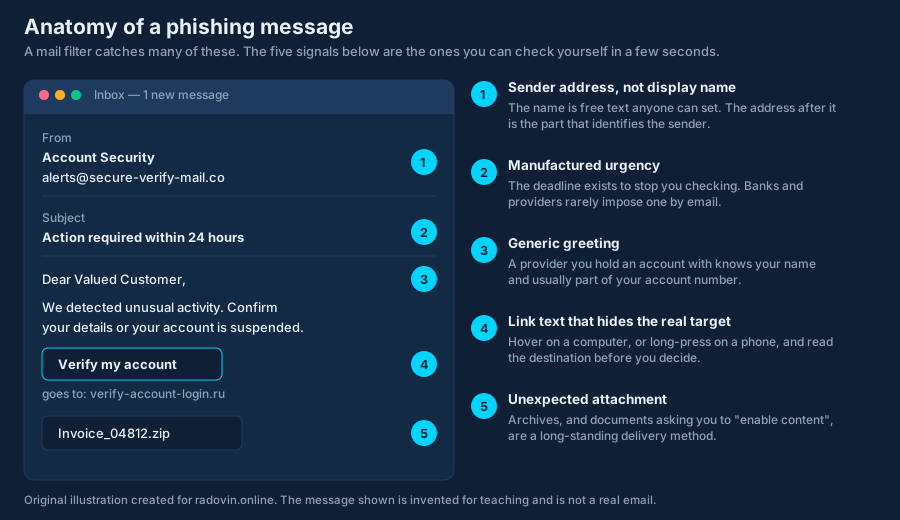
1. Read the address, not the display name
The sender name is free text that anyone can set to anything. The address after it is the part that identifies the sender. On a phone this is often collapsed — tap the name to expand it. Watch for lookalike domains: an extra word, a hyphen, a different top-level domain, or a character substitution that reads correctly at a glance.
2. Distrust the deadline
“Within 24 hours”, “your account will be suspended”, “final notice”. Urgency exists to stop you checking. Genuine providers rarely impose a same-day deadline by e-mail, and none of them will mind if you log in through your own bookmark instead of their link.
3. Notice a greeting that fits anyone
“Dear Valued Customer” is a sign the sender does not know who you are. This one is weakening as a signal: data from breaches lets attackers personalise messages, so a message that does use your name is not thereby trustworthy.
4. Check where the link really goes
Hover over a link on a computer and read the destination in the status bar; long-press on a phone to see
it. Compare it with the domain you expect. Look at the part immediately before the first single slash
— that is the real domain. yourbank.com.login-secure.example is not your bank; it is
example.
Shortened links hide the destination entirely. If you cannot see where a link goes, do not follow it from the message.
5. Treat unexpected attachments as hostile
Archives, and documents that ask you to “enable content” or “enable macros”, are long-standing delivery methods. So are files whose extension is disguised. If you were not expecting a document, confirm through a channel you already had — a number you already hold, not the one in the message.
- Spear phishing — targeted at you specifically, using real details about your job or your recent activity.
- Business e-mail compromise — an invoice or payment-details change that appears to come from a colleague or supplier. Verify bank-detail changes by phone, always.
- Smishing and vishing — the same thing by text message or voice call, including callers who claim to be your bank’s fraud team.
- MFA fatigue — repeated push approval prompts sent until you tap one to make them stop. Never approve a prompt you did not trigger.
- Quishing — a QR code standing in for the link, because a code cannot be hovered over.
What to do if you already clicked
- If you entered a password, change it now — on that service, and anywhere you reused it. Do it from a different device if you can.
- Sign out all sessions in the account’s security settings. A stolen session cookie survives a password change; ending sessions is what revokes it.
- Check multi-factor settings for a device or method you do not recognise, and check mail rules for a forwarding rule you did not create. Both are standard attacker persistence.
- If you opened an attachment, disconnect from the network and run a full scan. If the machine handles anything important, assume it needs rebuilding rather than cleaning.
- If money moved, call your bank immediately — speed matters more than anything else — and report it to the police.
- Tell someone. If it was a work account, report it straight away. Delay causes more damage than the click did.
Where to report it
- Your e-mail provider’s “report phishing” control, which improves filtering for everyone.
- The impersonated organisation — most banks publish an abuse address.
- In the Czech Republic, NUKIB and the national CERT publish guidance and reporting routes: nukib.gov.cz and csirt.cz.
- Consumer-facing guidance across the EU is collected by ENISA: enisa.europa.eu.
Where software helps, and where it does not
Mail filtering and web filtering remove a large share of these messages before you ever see them, and an antivirus product’s web protection can block a known phishing domain at the moment you click. None of that helps against a brand-new domain registered an hour ago, and none of it helps if you type your password into a page you reached by yourself. The habit is the control; the software reduces how often you need it.
See also: the eight-point checklist and how antivirus software works.